Blueprint › codelab
Check a QNX system's architecture on every build with Blueprint
Write down which processes may message which, check it against a kernel trace in CI, and let the QNX kernel enforce it. Along the way, two things the docs don't spell out: why a send timeout won't free a REPLY-blocked client, and why secpolgenerate learns nothing while tracelogger runs.
By Dmytro Topka. Source.
1. Welcome
A QNX system is a set of processes that talk through synchronous messages: a client calls MsgSend() and waits until the server calls MsgReply(). That design is what lets one process crash without taking the others with it. It is also where systems quietly lock up, when a client waits on a server that never answers.
In this codelab you will:
- replay a recorded five-process system and see Blueprint catch a deadlock, a hung camera and a slow server;
- write an architecture contract for your own system;
- record a kernel trace on a QNX 8.0 target, kill a process on purpose and check what happened;
- add the check to GitHub Actions.
No hardware is needed. Steps 1 and 2 run on any Mac, Linux or Windows host without the QNX SDP.
2. Prerequisites
For the first part:
- Python 3.10 or newer
- git
For recording your own traces:
- QNX SDP 8.0 (the free non-commercial license from QNX Everywhere is enough)
- a QNX 8.0 target: a QEMU image made with
mkqnximage, or a board
Optional:
- an Anthropic API key, if you want each finding explained in plain words
3. Run the demo
Clone the repository and install it:
git clone https://github.com/DmitriyTopka/qnx-blueprint.git
cd qnx-blueprint
python3 -m venv .venv && . .venv/bin/activate
python3 -m pip install .
Replay every recorded scenario:
blueprint demoYou should see fifteen rows and the last line all scenarios behaved as expected. Each row is a real trace recorded on QNX 8.0 in QEMU from the demo system in demo/cockpit: five processes called gps, nav, camera, logger and display. Nine of them break something on purpose:
| Scenario | What was broken |
|---|---|
deadlock | gps asks nav for a hint while nav waits on gps |
backdoor | display reads gps directly, bypassing nav |
camera-hang | the camera stops answering and the display freezes with it |
camera-dies | the camera is killed and the display treats the error as fatal |
slow-reply | nav answers in 200 ms against a 50 ms budget |
deadlock-late | the deadlock happened before the trace started |
camera-hang-late | the camera stopped answering before the trace started |
prio-inversion | logger keeps priority 10 on a fixed priority channel while display waits at 30 |
resmgr-backdoor | gps is a resource manager; display opens /dev/cockpit/gps itself |
The other six pass: ok, ok-late, resmgr-ok and the fixed builds camera-hang-fixed, camera-dies-fixed and prio-inversion-fixed.
4. Read a report
Open out/camera-hang.html in a browser.
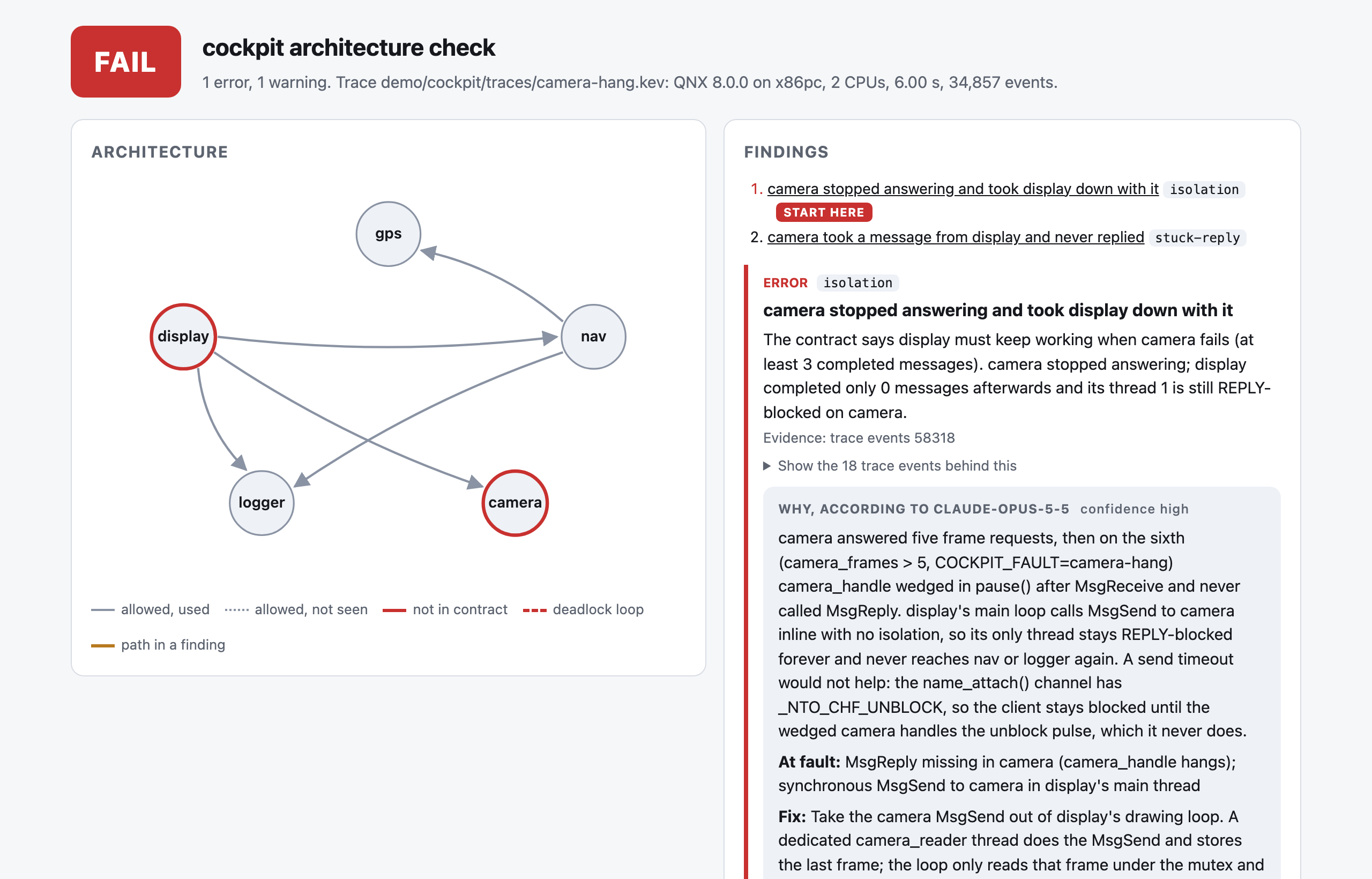
- The Architecture graph shows the five processes. Grey arrows are message paths the contract allows. A red circle marks a process involved in an error.
- The Findings list says what is wrong. Here: the camera stopped answering and took the display down with it. Every finding lists the trace events it is based on.
- The Why box is Claude's explanation. It names the call at fault and proposes a patch. It may only cite events Blueprint gave it; anything else is removed before you see it.
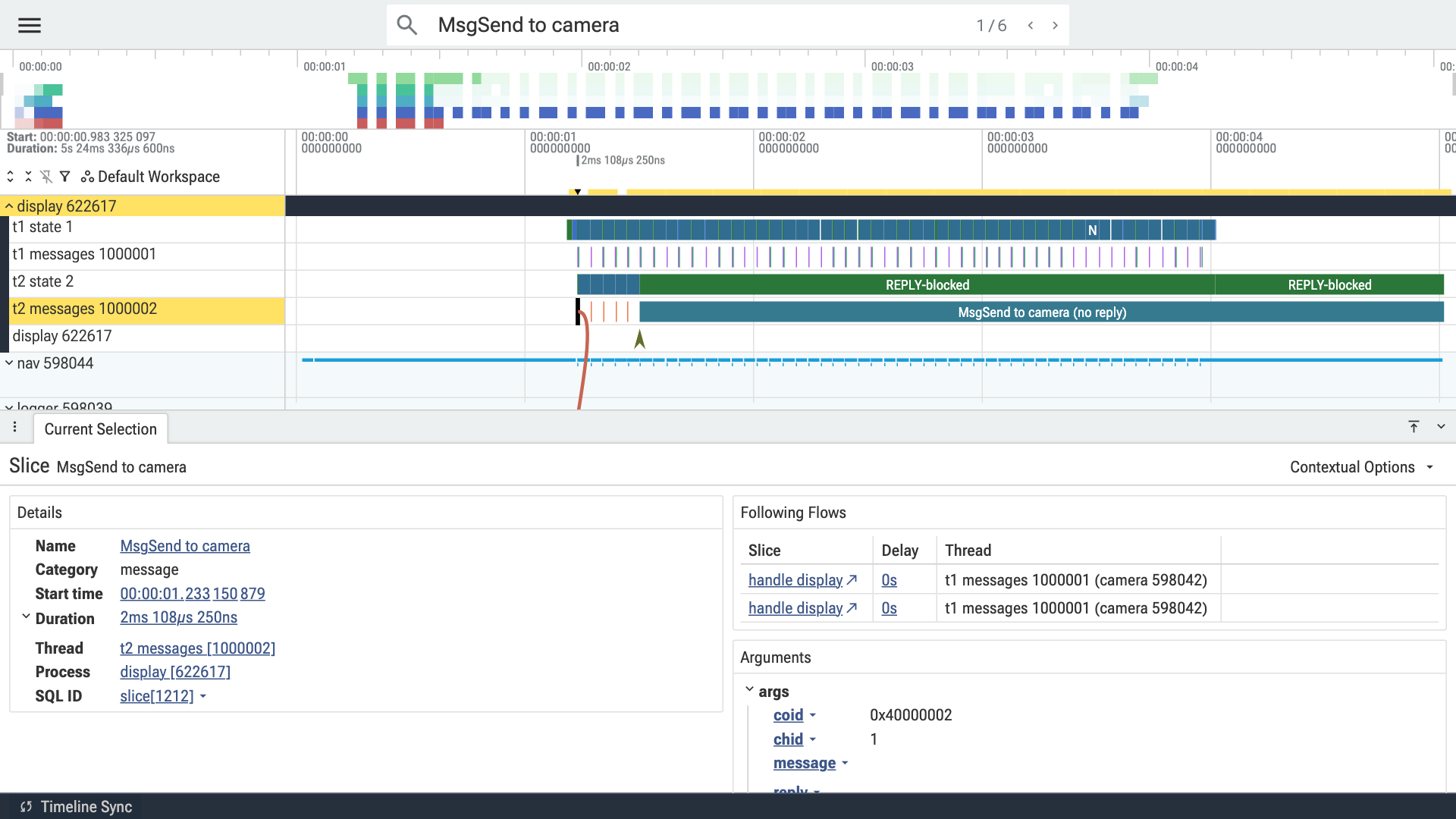
Now open out/camera-hang-fixed.perfetto.json at ui.perfetto.dev: the same stuck camera, with the fix. Expand display: thread 1 keeps drawing while thread 2, the camera reader, sits in REPLY-blocked on a MsgSend to camera that never got a reply. Click the message slice to see the arrow to the camera thread that received it.
5. Write your first contract
Create blueprint.yaml next to your project. List the processes you care about and the message paths you designed:
system: my-system
processes: [sensor, fusion, ui, logger]
allow:
  - ui -> fusion
  - fusion -> sensor
  - fusion -> logger
  - ui -> logger
reply_budget_ms:
  fusion: 30
  default: 20
isolation:
  sensor:
    must_survive: [ui]
min_progress: 3allow: a message from one listed process to another that is not here fails the build. Messages to system servers such as procnto are ignored.reply_budget_ms: how long a server may keep a client waiting. Times come from the trace clock; under emulation they are inflated, so start generous.isolation: whensensordies or stops answering,uimust still complete at least three messages.
Blueprint rejects a contract with unknown keys or names that are not in processes, so typos fail loudly.
6. Record a trace on your target
No target yet? Build a QEMU image with mkqnximage from the SDP. A stock image has tracelogger but no sshd-auth where sshd looks for it, so add that first, in the image folder:
mkdir -p local/snippets
echo '[perms=555] /usr/libexec/sshd-auth=usr/libexec/sshd-auth' >> local/snippets/ifs_files.custom
mkqnximage --type=qemu --arch=x86_64 --ssh-ident=$HOME/.ssh/id_ed25519.pub --build
qemu-system-x86_64 -m 1G -smp 2 -cpu max -display none -serial file:serial.log \
  -kernel output/ifs.bin -drive file=output/disk-qemu.vmdk,if=ide,id=drv0 \
  -netdev user,id=net0,hostfwd=tcp::2222-:22 -device virtio-net-pci,netdev=net0
When serial.log says Startup complete, ssh -p 2222 root@localhost gets you a shell on QNX 8.0. The first boot under software emulation can take a few minutes.
On the target, start the trace in wide mode, exercise the system, and save the thread states when the trace stops:
tracelogger -w -s 5 -f /tmp/run.kev
pidin > /tmp/run.pidin
Use wide mode (-w): it adds thread priorities and the first bytes of each message. Without it Blueprint still finds the edges, but warns that the trace is not wide and refuses the priority inversion check. If Blueprint reports trace-loss, the kernel buffers filled up before tracelogger could write them out; record again with more buffers (-k 32) or run tracelogger above the load (on -p 40 tracelogger ...). The pidin snapshot matters when something was already stuck before tracing began, because a thread that never changes state emits no events.
Copy both files to the host:
scp -P 2222 root@localhost:/tmp/run.kev root@localhost:/tmp/run.pidin .7. Break it on purpose
A contract that says camera may die is only worth something if you kill the camera and watch. With sshd on the target, Blueprint does that in one step:
blueprint record root@localhost -c blueprint.yaml --inject sensor@1.5 -d 5 -o run.kev --html report.htmlIt starts the trace on the running system, sends SIGKILL to sensor 1.5 seconds in, saves pidin at the end, copies both files back and checks them. You should see inject sensor: killed 1 process(es) and then either PASS, or an isolation error that names the process sensor took down with it.
If your target is a QEMU VM inside a container, pass the ssh command with --ssh, for example --ssh "docker exec -i qnx-qemu ssh -p 2222".
8. Check the trace
blueprint check run.kev --contract blueprint.yaml --html report.html --perfetto run.perfetto.jsonThe exit code is 0 when the trace matches the contract, 1 when it does not, and 2 when an input is invalid. run.pidin next to the trace is picked up automatically.
To have each error explained, pass your sources and an API key:
export ANTHROPIC_API_KEY=...
python3 -m pip install anthropic
blueprint check run.kev -c blueprint.yaml --explain --source src/ui.c --source src/fusion.c --html report.html
One explanation costs about 0.06 USD. Answers are cached next to the contract, so the same finding is never paid for twice.
9. Let the kernel enforce it
The contract can also become part of a QNX security policy. Generate the channel rules:
blueprint secpol -c blueprint.yaml --attach sensor=/dev/name/local/sensor -o mine.secpolEach process gets a type (sensor_t, ui_t, ...), each allowed edge becomes allow ui_t fusion_t:channel connect;, and each server may attach its name. Compile it with secpolcompile -o mine.bin mine.secpol to check the syntax. To enforce it, merge it into your system policy and start each process with its type, for example on -T sensor_t sensor.
If you build your policy with secpolgenerate, compare what it learned with the contract before you ship:
cat /dev/secpolgenerate/policy > learned.secpol      # on the target
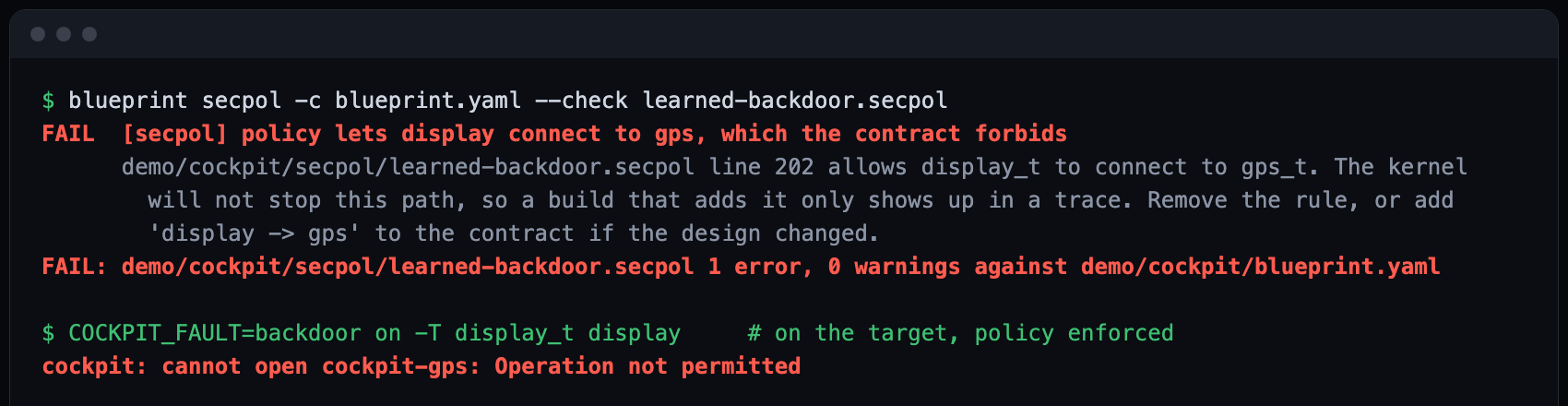
blueprint secpol -c blueprint.yaml --check learned.secpolA connection the policy does not allow fails in the kernel with EPERM, so name_open() returns -1 and strerror(errno) says "Operation not permitted".
A fully secure image, step by step
The full walk-through, run from scratch with every output, is its own codelab: Lock a QNX 8.0 system to its design with a security policy.
The serial logs, image options and ssh sessions of the two secure images this step was tested on are in demo/cockpit/secpol/evidence.
This is how we booted the demo in --secpol=secure mode, where no process runs without a policy.
- Build and boot a learning image:
mkqnximage --secpol=develop --build. secpolgenerate now watches the system and writes down what it does. - Do everything the secure system will have to do, and nothing it must not: log in with ssh a few times, copy a file both ways with scp, start each of your processes with its type (
on -T sensor_t sensor &), run them, and use the tools you will need (pidin,slay). Do not runtraceloggernow. - Save what it learned and check it against the contract:
cat /dev/secpolgenerate/policy > learned.secpolon the target, thenblueprint secpol -c blueprint.yaml --check learned.secpolon the host. A backdoor that ran during learning shows up here as a FAIL. - Add what learning cannot see. Tracing needs
allow user_root_t self:ability { trace };. On x86_64 we also neededallow sshd_t self:ability { setgid:0 setuid:0 };before ssh key logins worked (a secondsshd -don another port showedinitgroups: root: Operation not permitted). - Build and boot the secure image:
mkqnximage --secpol=secure --policy=learned.secpol --build. Log in, start your processes with their types, and try the build that breaks the contract.
10. Add it to CI
Commit a recorded trace (or record one in a job that boots your QEMU image) and add one step to your workflow:
- uses: actions/checkout@v7
- uses: DmitriyTopka/qnx-blueprint@v0.2.0
  with:
    trace: traces/nightly.kev
    contract: blueprint.yaml
The step writes report.html, report.json and a Perfetto trace to blueprint-report/, puts a summary on the job page and fails the job on any violation.
11. What you learned
- How synchronous message passing can freeze a QNX system, and why a send timeout does not always save the client.
- How to write the intended architecture down as a contract.
- How to record a wide kernel trace and a
pidinsnapshot on a target. - How to check a trace locally and in CI, and read the report in Perfetto.
- How to turn the contract into security policy rules, check a learned policy against it, and boot a fully secure image.
Questions and ideas are welcome in the issue tracker.